
Explore places with an avatar
Pyjam also explores a different way to experience a place: a person on location shares a live view. Check the app for currently available destinations and options.


Streaming
Avatar
Stream map
Download
Choose a place on the map and open a public stream in Pyjam. See what is available now, then decide what you want to watch.


A live stream lets you join the moment as it happens. A replay lets you watch an available recording later. Explore both from the app, where availability can change.

Choose a simple subject, check your camera and microphone, and decide what part of your surroundings you want to show.
Pick a moment you can describe in your own words
Check your connection, sound, and battery
Open the creator flow when you are ready


1Choose a place or an everyday activity
2Check what the camera will reveal
3Start only when your setup feels right
A thoughtful mobile stream starts before you press Go Live. Keep private details out of frame and decide whether sharing your location is appropriate.

A stream can turn a walk, a craft, or a conversation into a shared moment. See which public broadcasts and replays are available in the app.
Look for streams around a place that interests you
Join the conversation when a live chat is available
Return to an available replay afterward


Watching a live video can be a conversation. Follow the action, send a comment when the chat is open, and use reactions that fit the moment.
See reactions during an available live stream
Use Pyjam stickers where supported
Keep comments respectful and report a problem when needed

A drawing, a recipe, or a small project can be the subject of a mobile stream. Show a process you know and make room for questions.
Explain one step at a time
Keep the camera focused on the activity
Choose a clear subject for the next stream

Open the map in Pyjam to look for public videos connected to places. Explore a city or a nearby area without assuming a stream is live at every location.
Public live streams and available replays
Search by place rather than a fixed schedule
Open a stream to see its current details


Pyjam also explores a different way to experience a place: a person on location shares a live view. Check the app for currently available destinations and options.
An avatar experience can let a remote visitor suggest what to see next. Controls, routes, and availability depend on the experience offered in the app.

Compare a live perspective with a saved video before choosing a format. A live connection can respond to the moment; a recording can be watched later.

Explore the avatar area in Pyjam to see whether a live experience is available. You can also start with public streams on the map when you simply want to watch.


Find public streams and available replays on the map. If you want to share your own moment, use the app to check the creator flow and prepare your phone.
Watching and creating are different paths. Start with the map to explore; open the creator area only when you are ready to set up a broadcast.
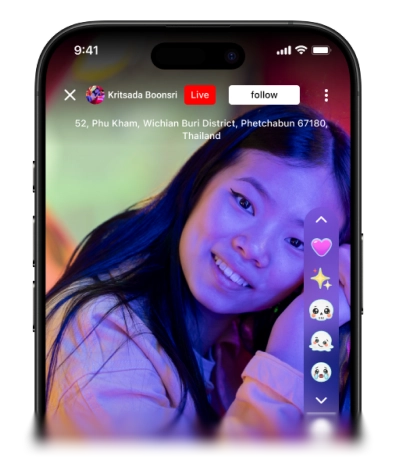
Check your camera, microphone, connection, and what will appear in the frame before going live.